COMMUNICATION POWER / 10
Build a 72-hour phone power budget before the outage.
A power bank is only a claim until your exact phone, cable, signal conditions, and check-in routine have been tested. Measure one normal day, schedule the important uses, and protect the last useful charge.
People searching for how to keep a phone charged during a power outage usually want a product answer: a certain power-bank size, a solar panel, or a hand-crank charger. Public discussions reveal why that answer often disappoints. The cable was in a different bag. The bank had self-discharged. Weak cellular signal drained the phone faster. A household spent its reserve streaming updates. A car charger worked, but using it raised a more serious carbon-monoxide question. Other households discovered that a powered phone did not guarantee a working network.
The Federal Emergency Management Agency’s 2025 Power Outage Incident Annex treats this as a system problem. It says public communication may be most effective in the first four to eight hours after a major power loss and may then degrade as device batteries and communications infrastructure lose power. That is not a promise that any phone lasts a particular number of hours. It is a reason to receive useful information early, reduce avoidable use, and keep more than one way to obtain instructions.
Define what the phone must still do
Begin with functions, not apps. One household may need the phone for Wireless Emergency Alerts, two daily check-ins, an accessible communication service, transit information, and a possible emergency call. Another may also need a medical portal, translation tool, building-entry credential, digital payment, or caregiver coordination. List each essential use and whether it works without internet, without cellular service, or without unlocking the phone.
| Job | When it matters | Connection | Lower-power fallback |
|---|---|---|---|
| Official alerts | Continuous or at planned listening windows | Cell broadcast, radio, local system | Battery radio; neighbor or building check-in |
| Household status | 08:00 and 20:00 | Text first; brief call if needed | Out-of-area contact and meeting place |
| Navigation | Before travel | Downloaded map or data | Paper map and written address |
| Urgent help | As needed | Voice, text-to-911 where locally supported | Know the nearest staffed help point |
FEMA’s family communication guidance recommends writing down important numbers, choosing an out-of-area contact, practicing the plan, and using texts when possible because they use fewer network resources than voice calls. It also says to keep calls brief and wait before redialing rather than adding to congestion. A phone budget works best when the household has agreed who sends the update, who receives it, and what silence means.
Run a 24-hour baseline test
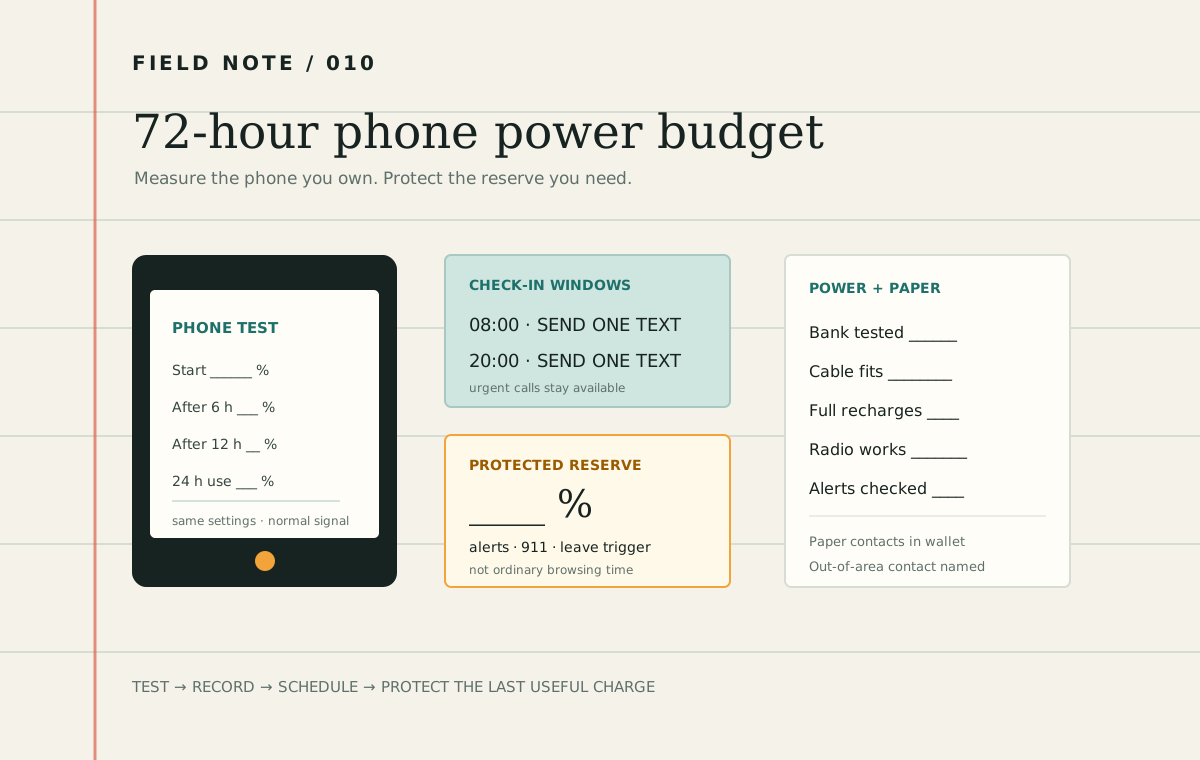
Battery percentages are easier to plan with than advertising claims. On a calm day, charge the phone to 100 percent, unplug it, and use the settings and accessibility tools you would realistically keep during an outage. Record the percentage after six, twelve, and twenty-four hours. Note signal strength, screen time, navigation, calls, camera use, hotspot use, streaming, and unusually hot or cold conditions. Do not create a hazardous test and do not disable a feature needed for health or safety.
One-day phone log
Phone / battery age: __________________________________________________
Start time and charge: _________________________________________________
6-hour charge / main uses: _____________________________________________
12-hour charge / main uses: ____________________________________________
24-hour charge / main uses: ____________________________________________
Signal conditions: ____________________________________________________
Accessibility or health functions kept on: _________________________________
Daily percentage used: _________________________________________________
If the phone used 35 percentage points in a representative day, three identical days would require about 105 percentage points before charging losses or changing conditions. That arithmetic is a starting estimate, not a guarantee. Searching for service, cold, heat, battery age, maps, video, hotspot use, and repeated calls can change demand. Use the result to decide which behaviors deserve a schedule and how much charging reserve to test.
Spend power by priority
FEMA and FCC guidance recommends reducing screen brightness, closing unneeded apps, and limiting video, games, and large downloads during an emergency. Airplane mode can reduce radio use during a planned quiet period, but it also interrupts services. Do not leave it on when you must receive calls, texts, data, or emergency alerts. Set an alarm or use a paper schedule so connections are restored before each check-in window.
- Receive and preserve. Read the official alert, save or write down the action, then close the screen.
- Send one status message. Use a short group text or the agreed out-of-area contact rather than separate calls.
- Download once. Save the route, shelter address, utility number, and local instructions for offline use while service exists.
- Separate information from entertainment. Use a battery radio for repeated updates when available; keep the phone for two-way communication.
- Protect the final reserve. Choose a battery percentage that is not spent on routine browsing. Reserve it for urgent contact, an evacuation change, or the trip to a confirmed charging place.
The reserve is a decision trigger, not a magic number. A household that depends on a phone for accessible communication or a health-related call may need a larger reserve and more charging layers. Someone with a nearby, staffed destination may need less. Write the action: “At 30 percent, stop ordinary use and confirm the destination,” is stronger than “save battery.”
Test every charging layer end to end
Do not convert the milliamp-hour number printed on a power bank directly into promised phone charges. Voltage conversion, cable resistance, heat, battery management, simultaneous phone use, age, and protective cutoffs reduce what reaches the phone. Charge the bank fully, connect the exact cable and adapter, record the phone’s starting percentage, and measure the percentage gained before the bank stops or reaches the reserve specified by its instructions. Repeat after several months.
| Layer | Test | Record | Constraint |
|---|---|---|---|
| Wall charging | Phone, plug, cable, surge protection | Time from 20% to 80% | Utility power may be intermittent |
| Power bank | Exact bank and cable | Phone percentage gained | Age, temperature, self-discharge |
| Vehicle | Exact port and adapter outdoors | Gain in 20 minutes | Fuel, weather, CO, vehicle battery |
| Solar | Panel, controller, bank, weather | Bank percentage gained per day | Season, shade, orientation, storage |
| Confirmed public site | Hours, accessibility, route | Contact and opening trigger | May close, crowd, or lose power |
Solar output can vary sharply with season, clouds, shade, panel angle, and temperature. A hand-crank radio’s USB port may provide only a small emergency contribution. Test either as a real system before depending on it. Charging the power bank first and then the phone can make the workflow easier to manage, but it introduces another conversion step; measure the result.
- Phone baseline: ___ percentage points used per 24 hours.
- Bank result: ___ percentage points delivered through the packed cable.
- Vehicle result: ___ points delivered in 20 minutes outdoors.
- Solar result: ___ points added to the bank in November conditions.
- Target: three days of essential use plus the protected reserve.
- Retest: every six months and after a device, cable, bank, or routine changes.
Treat vehicle charging as a CO decision
FEMA’s communication plan notes that a car charger can be useful only in a well-ventilated area, not a closed garage. CDC is more explicit: never run a vehicle in a garage or other enclosed or partly enclosed space, even if the garage door is open. Carbon monoxide cannot be seen or smelled and can cause sudden illness and death.
Wait until the hazard outside has passed, move the vehicle fully outdoors and away from doors, windows, and vents, follow the vehicle manual, and stay aware of fuel and the starting battery. Never sit in a snow-blocked exhaust path. Vehicle charging is one layer, not permission to enter unsafe weather or a substitute for a charged bank kept inside.
Keep alerts available without making the phone the only alert
Wireless Emergency Alerts are geographically targeted, text-like messages delivered through participating providers to compatible devices. Review the phone’s current emergency-alert settings and accessibility options before severe weather; settings and labels vary by device and provider. Also enroll in local opt-in alerts if your emergency-management agency offers them. Neither system guarantees delivery everywhere.
Pair the phone with a battery-powered or hand-crank weather radio where appropriate, and learn which local station carries official information. Keep the radio’s batteries separate or installed as its instructions recommend, and test reception. A second channel matters because a charged phone and a working cellular network are separate dependencies.
Create the paper layer
A dead, lost, damaged, or locked phone should not erase the plan. Put a small card in each wallet or kit with household numbers, the out-of-area contact, utility outage number, local non-emergency number, meeting places, one accessible destination, and any information a household member needs to communicate safely. Do not put account passwords, full medical records, or unnecessary personal data on the card.
Download maps and key documents only when it is safe and lawful to store them on the device, but print the minimum route and address as well. If the phone is used as a building key, payment method, transit pass, translator, or communication aid, map that dependency in the personal-needs dependency guide and design a fallback with the service provider or support network.
Run a two-window communication drill
Choose a normal day and pretend household communication is limited to two windows, such as 8 a.m. and 8 p.m. Do not turn off services needed for safety, care, work, or school. At each window, send the agreed text to the out-of-area contact, check official sources, and record the battery percentage. Between windows, use the paper plan and offline information.
- Confirm everyone recognizes the same short status format: location, safety, next action, next check-in.
- Have another household member find the paper card without help.
- Charge from the packed power bank with the packed cable.
- Check whether alert and accessibility settings still work after any low-power changes.
- End by restoring normal settings, fully recharging every layer, and writing one correction.
Link the result to the household backup-power budget so phone charging does not quietly compete with medical equipment, refrigeration, lighting, or another higher-consequence load. Then use the one-hour outage test to see whether the router, cellular signal, radio, and paper contacts still support the plan when ordinary power is removed.
Write the action card
72-hour phone power card
Essential phone jobs: __________________________________________________
Daily check-in windows: _________________________________________________
Out-of-area contact / paper card location: _________________________________
24-hour battery use from the test: _______________________________________
Tested power-bank delivery: _____________________________________________
Protected reserve and action: ___________________________________________
Radio / alternate official source: ________________________________________
Confirmed charging destination / route: __________________________________
Owner and next six-month test date: _____________________________________
Questions people ask before an outage
How do I make the battery last longer?
Reduce brightness, close unneeded apps, limit video and large downloads, and schedule short use windows. Airplane mode can help during a quiet period only when calls, texts, data, and alerts are not needed. Preserve required accessibility and health functions.
How large should my power bank be?
Large enough to deliver the tested percentage your essential routine needs, with a reserve, while remaining something you can safely store, charge, and carry. Compare measured phone percentage gained, not only capacity on the label.
Should I keep trying a call that will not connect?
Use text when appropriate, keep calls brief, and wait before redialing. Repeated attempts use battery and can add to network congestion. Call 911 for emergencies, and follow local instructions for text-to-911 availability.
What if I have power but no service?
Use the planned alternate: battery radio, local broadcast, paper meeting plan, out-of-area contact when another network becomes available, or a confirmed staffed location. Do not enter a hazard simply to search for a signal.
Primary sources checked
- FEMA — Power Outage Incident Annex — communications degradation, public messaging, and device-power constraints during a long outage.
- FEMA Ready.gov — Family Emergency Communication Plan — text-first communication, written contacts, battery conservation, backup charging, practice, and vehicle CO precautions.
- FEMA — Get Tech Ready — emergency charging options, alerts, and conserving mobile-device power.
- FCC and FEMA — Tips for Communicating During an Emergency — network congestion, phone settings, vehicle charging, and limiting high-bandwidth use.
- FCC — Wireless Emergency Alerts fact sheet — current WEA capabilities and accessibility context.
- CDC — Power Sources — car chargers, power banks, adapters, radios, batteries, and CO detectors.
- CDC — What to Do During a Power Outage — carbon-monoxide hazards and the prohibition on running engines in enclosed or partly enclosed spaces.
Sources reviewed November 14, 2026. Public discussions were used to identify repeated questions about power-bank sizing, weak-signal drain, solar and hand-crank performance, misplaced cables, car charging, and phones that remain powered after cellular service fails. Safety and communications recommendations were resolved against FEMA, FCC, and CDC guidance. Follow the current instructions for each device, battery, vehicle, and local alert system.